Objectives
In this exercise, you will:
Use the STL set container to store a set of values.
Use the STL map container to create an associative array whose keys are string values, and whose values are sets of strings.
Use iterators to access the items in these containers.
Introduction
This lab/project has you creating a simple database of movies and the actors in the movies. Then the user of the program can choose to:
Show all movies
Show all actors in a movie
Show all movies an actor was in.
The main data structure you’ll create is an STL map that maps:
movie name → set of actors in the movie.This is a complex data structure: each entry in the map contains a set (Thus, we’ll have a binary search tree of binary search trees).
We’ll use the Bridges database of movie information. When you get the information from the Bridges API, you get a vector of objects of type MovieActorWikidata. Each object contains a movie and an actor in the movie (among other things). If you printed out those two things from MovieActorWikidata objects, you might see these values.
Movie: Young at Heart         Actor: Alan Hale, Jr.
Movie: Wichita                Actor: Carl Benton Reid
Movie: We're No Angels        Actor: Aldo Ray
Movie: Young at Heart         Actor: Doris Day
Movie: Wichita                Actor: Joel McCrea
etc...
Thus, you see that the objects are not in any order, and do not have all the actors in a movie in each object. To get all actors for a movie, you’ll have to iterate over all the elements of the vector and learn (1) all the movies, and (2) all the actors in the movies.
Note that sometimes an actor is listed multiple times for a movie. But, because we are using an STL set, it automatically handles attempts to insert an element multiple times.
Menu
The application presents a menu from which the user can select the operation s/he wishes to perform. To validate a user’s menu-choice, our project uses a tree-based data structure — the STL set. For example, if the valid menu choices are a, b, c, d, e, f, and q, and we store these choices in a set named myValidChoices, then we might (simplistically) visualize this set as follows:
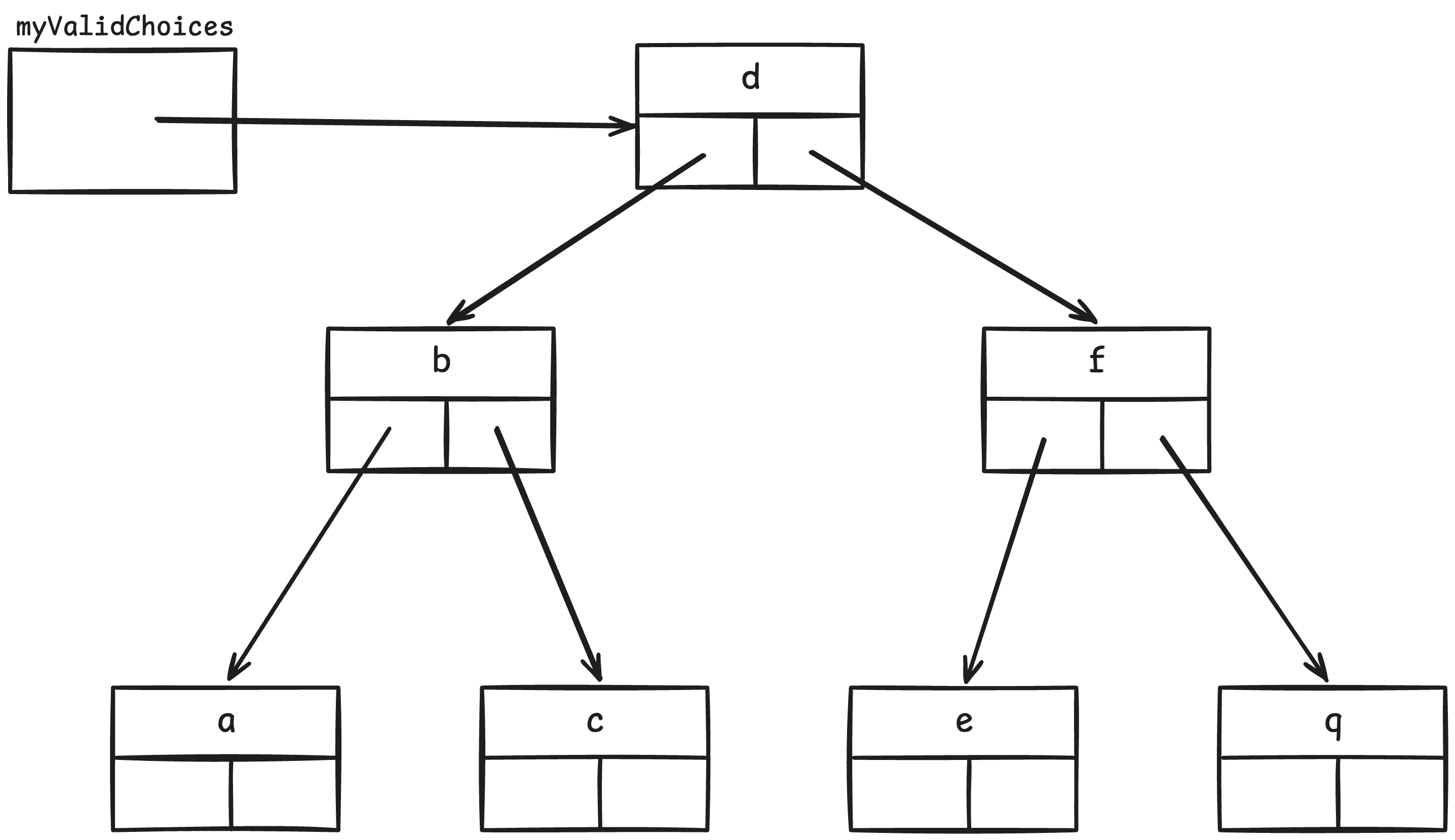
BST for the menu
To determine whether or not a character is present in this set, the STL find(value) method does a binary search down through this tree until it either locates value, or reaches the bottom of the tree. It should be evident that the maximum time to search is O(lg(n)), where n is the number of items in the set.
The exercise will provide you with a “skeleton” application, which you will then complete by adding additional functionality.
Getting Started
Accept the invitation from github classroom and use git clone, as usual. Make sure you and your partner are in the same Team.
Edit the README.md file to add both your names and your partner’s.
Part I. The Menu Class
When dealing with menu-driven systems, one thing that can go wrong is if the user enters an invalid choice — something that is not on the menu. When this happens, the program must detect it and take remedial action.
One way to detect such a problem is to build a Menu class that, besides “remembering” its menu, “remembers” its set of valid menu choices. Then when the user enters a choice, we can validate their choice by checking whether or not their choice is an element of that set.
As you can see, our Menu class contains two instance variables in Menu.h: a string storing the menu, and a set to store those menu choices that are valid:
string myValue;             // the menu that is displayed
set<char> myValidChoices;   // the valid menu choices
The Menu Constructor
The Menu constructor currently initializes our myValue member; it must also initialize myValidChoices so that it stores the valid menu choices. To do so, we can use the insert() method:
setVariable.insert(value);that inserts a single value into a set.
In Menu.cpp, add insert() calls to make myValidChoices represent the set {‘a’, ‘b’, ‘c’, ‘q’}.
Save/compile your project, and verify that everything compiles without errors.
The Menu::containsChoice() Method
To let a program conveniently check whether or not a given character is a valid menu choice, the Menu class provides a boolean method containsChoice(choice) that returns true if and only if choice is a valid menu choice. Currently, this method is a stub-definition that returns false. Your next task is to revise this stub so that it returns true if and only if choice is in the set myValidChoices. Our application already supports checking for valid menu choices, and should work correctly when we fix up the containsChoice() function.
We can accomplish this using the STL set find() method. You may find documentation for the STL set class useful for understanding how find() works.
Save/compile your project, and when it is free of compilation errors, run the program. When it is free of errors, go on.
When you run your program, you will need to provide your Bridges UserName and Id on the command line: e.g.,
./movies CS112StudentUsingBridges 123555666Part II. The App Class
The file App.h contains the declaration of class App. This class uses an STL map to store (movieName, set of actors) pairs:
map<string, set<string>> movies_by_name; // key is movie name; value is set of actors' names.You may find that it is useful to have documentation for the STL map pulled up!
Constructor
The App constructor has been defined for you. It takes a vector of MovieActorWikidata entries as a parameter. It is suggested that you have the Bridges API DataSources documentation pulled up for this section, so you can understand the return types necessary.
The constructor code contains the algorithm you should implement to process these entries, building up entries in the movies_by_name map.
Note that you can access a map with [ ], and it will either create a new entry or update it if it already exists. Using this the body of the for loop is one line. Otherwise, the body is about 9 lines, and is very tricky code.
Write the code now. This code will be difficult to test until you implement the next step. Save/compile your project, and when it is free of compilation errors, move onto the next step.
Show All Movies Option
Implement code for showAllMovies(), to iterate through all entries in movies_by_name, and print out the movie name and then iterate through all actors for that movie, printing them out. I’ve indented the actor’s name, so the output is more readable.
You might find it very useful to make the inner loop a separate function. I called that function showActorsInAMovie(). It takes an iterator “pointing” to an object from the movies_by_name collection, and iterates over the “second” field (a set), printing each actor in the set. If you implement this function, you’ll find you can use it again below.
When you think your code is correct (for this and the previous step), try loading all movies from 1955 (and only 1955) and printing them all out. The first movie should be:
Movie:  5 Against the House
        Alvy Moore
        Brian Keith
        George Cisar
        Guy Madison
        Hugh Sanders
        Jean Willes
        John Larch
        John Zaremba
        Kathryn Crosby
        Kerwin Mathews
        Kim Novak
        Mark Hanna
        Robert Sampson
        William Conrad
The last movie you should see should look like this:
Movie:  Young at Heart
        Alan Hale, Jr.
        Doris Day
        Dorothy Malone
        Elisabeth Fraser
        Ethel Barrymore
        Frank Ferguson
        Frank Sinatra
        Gig Young
        Lonny Chapman
        Robert Keith
Show All Actors For a Single Movie Option
Complete the code in the getMovienameAndShowActors() method. If you created a function to show all actors for a given movie, then you are half done already. For failures, make sure to output as directed a pretty message. For automated testing, make sure that the phrase “not found” is in your error message.
Here are some sample outputs:
Enter a movie name to see the list of actors: The Rawhide Years
     Arthur Kennedy
     Chubby Johnson
     Chuck Roberson
     Colleen Miller
     Don Beddoe
     ...
Enter a movie name to see the list of actors: The Matrix
The Matrix was not found!Show All Movies For an Actor Option
Finally, implement this option. Create a set of strings (I called my variable movies_by_actor.) And then go through all movies, looking for that actor. When you find him/her, add the movie to the movies_by_actor. Then, when you are done, print out the set. If the actor is not in any movies, make sure to print out a nice error message, including the words “not found” for the automated tester to check for.
Here are some sample outputs:
Enter an actor name to show all movies for that actor: Alfred Hitchcock
Rear Window
The Trouble with Harry
To Catch a Thief
Enter an actor name to show all movies for that actor: Linux Torvalds
Linus Torvalds was not found!Turn In
Submit your project to github as usual. If you worked with your lab partner on the project, make sure you update README.md to include both of your names/login-ids.
Automated Testing
There is an automated grader for this lab. You can run it locally to make sure everything is passing before submitting it to Github. To do so, run the command:
make testGrading Rubric
21 points total:
Menu class works: 2 pts.
App constructor: 5 pts.
Each App menu item: 4 pts each: 12 pts.
Hospitable code: code is clean and neat, perfectly indented, with good variable names, etc.: 2 pts.
Ways students have lost points in the past:
-2: showAllMovies needs to show the names of each movie’s actors
-2: getMovieNameAndShowActors implementation is incorrect, the result of movies_by_name.find will return the iterator value you want to pass to showActorsInAMovie, the for loop is unnecessary
-2: code is very poorly indented
-2: parameter names are very poorly chosen