Assignment 03: File I/O, Exceptions and 2D Arrays
Start with §1, Getting the Code. Clone your repository and open it in VS Code before you read anything else on this page, because everything here refers to files that are in it.
Plan to set aside about 3 to 3.5 hours. Reading the file (loadWorld) and writing the simulation rules (step) are the two long sections, between them they are most of the assignment. The experiment in §9 takes about fifteen minutes and will save you more than that.
Objectives
By the end of this assignment, you will be able to:
- Open a file with
ifstreamand check that it actually opened - Read numbers with
>>and whole lines withgetline, and explain why mixing the two needs care - Detect the end of a file, and detect a file that ends sooner than it promised
throwaruntime_errorwhen a function cannot do its job, andcatchit by reference somewhere useful- Write formatted output to a file with
ofstream - Declare, iterate over, and modify a two-dimensional array
- Pass a 2D array to a function, and explain why the column size is part of the parameter type
- Use a debugger to find a bug that is invisible in the source
These objectives map to course skills A1, A5, and A6. They also introduce B5 (unit testing), which you finish next week when you write tests of your own, here you only have to read and run the ones you are given.
Lab and homework. You start this in lab on Tuesday, and by then you will have had Monday’s lecture on file I/O, enough for §4 and most of §5. Exceptions come on Wednesday and 2D arrays on Friday, so the rest of §5 and all of §6–§10 are homework. The sections below are in the order you can actually do them.
1. Getting the Code
Do this first, before reading any further. Everything below refers to files that are in your repository, and the next section asks you to open one of them and watch it run. Get the code down and open in VS Code, then read on.
Your private GitHub repository for this assignment is created for you inside the course organization, with the starter code already in it. There is nothing to accept and nothing to set up, if you are on the roster, it is there.
Clone it, replacing YOURUSERNAME with your GitHub username. If gh asks you to sign in, see step 9 of Getting Started:
gh repo clone 26fa-cs112/cs112-a03-YOURUSERNAME
cd cs112-a03-YOURUSERNAMECannot find your repository?
If gh repo clone answers Could not resolve to a Repository, list the repositories you can see:
gh repo list 26fa-cs112If yours is in the list, you mistyped the name. Copy it from the output and try again. Usernames that already contain a hyphen or a number are the easy ones to get wrong, because the pattern is cs112-<assignment>-<your username>.
If the list is empty, or the command errors, email me. The usual causes are an organization invitation you have not accepted yet (check your email, including spam and the Promotions tab), or a username I mistyped when I built the roster. Write to eric.araujo@calvin.edu and I will sort it out the same day.
While you wait, do not create a repository yourself and do not start the work somewhere else. Only the repository I create for you is connected to grading, and work done anywhere else has to be moved over by hand.
Open the folder in VS Code, then build it before you change anything:
makeThat produces two programs: sandbox (the simulator) and tester (the unit tests). If make works now, you know that any error you see later is yours.
2. What You Are Building
Falling-sand games are a small genre of their own. You get a blank screen, a few kinds of material, and a set of rules about how each one behaves, sand piles up, water finds its way around things, walls stay put, and out of those three or four rules comes something that is oddly hard to stop watching.
None of it is complicated. There is no physics engine. There is a grid of characters, and once per tick you look at every cell and decide whether the thing in it should move. That is the entire program:
| Character | Element | What it does |
|---|---|---|
. |
empty | nothing |
# |
wall | never moves |
o |
sand | falls, piles up, sinks through water |
~ |
water | falls, and spreads sideways |
The whole simulation is a 2D array and a nested loop. You will work with a grid of characters, the data structure this week is about, and a simulation that runs for four hundred steps to find out whether you got your loop right. A subtle mistake in a nested loop is invisible on paper. It is extremely visible when your sand falls through the floor.
You will write four functions:
loadWorld(), read a world from a file, and complain properly when the file is brokensaveWorld(), write the finished world back outstep(), advance the simulation by one ticksaveReplay(), write every frame into an HTML file you can play back
Everything else, the color drawing, the animation, the emitter loop, the argument parsing, the HTML and JavaScript for the replay player, is written for you. None of it is what this week is about.
See where this is going first, and do it now. The repository you just cloned contains demo.html, a recording of a finished simulator running worlds/showcase.txt. Open it (§3.1 below explains how) and press Play. That is what yours will do by the end of the week.
demo.html is a run of the same program you are about to write, so it is also the reference for what your own replay.html should look like when TODO 4 works.
3. What You Are Given, and What You Write
All the C++ you write goes in one file: sandbox.cpp. You will also add your name to README.md, and you will create worlds/mine.txt in §12, but no other code is yours to touch.
| File | What it is |
|---|---|
sandbox.cpp |
Yours. Four functions, four TODOs. |
sandbox.h |
Constants and prototypes. Read this first. |
main.cpp |
The driver: arguments, the emitter loop, the step loop |
render.cpp |
Color drawing, and the HTML replay scaffold |
tests.cpp |
catch unit tests for the rules. Read these too. |
worlds/ |
Worlds to run, including three deliberately broken ones |
makefile, test.py |
Build and check |
Open sandbox.h and read all of it before you write a line. It is short, and it is the contract for the entire program. Three things live there that this page does not repeat:
- The world is a two-dimensional array of characters,
char grid[MAX_ROWS][MAX_COLS]. Two indices,grid[row][col], row first. Every loop you write this week is a nested loop over that array. - The four elements are named constants,
EMPTY,WALL,SANDandWATER, holding.,#,oand~. Use the names. A typo inEMTPYis a compile error; a typo in'.'is a silent bug. - Every prototype you must match, exactly. What you write in
sandbox.cpphas to agree with the header down to theconstand the&.
Make it a habit from now on. The comments in sandbox.h, main.cpp and tests.cpp are written for you to read, and where a page and the code ever disagree, the code is the one that runs.
Running it:
./sandbox worlds/hourglass.txt 300            # watch it, in color
./sandbox worlds/hourglass.txt 300 --quiet    # no animation, no escape codes
The two arguments are the world file and the number of steps to run. --quiet suppresses the animation, which is what the tests use so they never have to sit through four hundred frames.
Run it now, and expect nothing to happen. The program builds and runs before you have written a line, and this is what it says:
Simulated 300 steps of worlds/hourglass.txt (0x0), 301 frames.

The world loaded as 0x0, so there was nothing to simulate.
That is what happens before TODO 1: loadWorld is empty, so it
never sets rows or cols. Expected right now. Start there.

No out.txt was written. saveWorld, TODO 2, is still empty.
No replay.html was written. saveReplay, TODO 4, is still empty.
That is correct behavior, not a broken repository. The four functions in sandbox.cpp are empty, so the world has no size and neither output file exists yet.
3.1 Opening an HTML file that lives on Coder
Your VS Code runs on your laptop, but your files live on the Coder server. So double-clicking demo.html in the Explorer just shows you the HTML source, there is no browser on the far end to render it.
There are three ways round that. Use the first one.
1. The HTML Preview extension, easiest. Open the Extensions panel in the left sidebar, search for HTML Preview by George Oliveira, and install it. Then open demo.html and use the preview button in the editor’s top-right corner. The page renders in a tab inside VS Code, so nothing has to travel back to your laptop and there is no server to remember to stop.
Install it once and it is there for the rest of the semester. You will want it again for your own replay.html later this week.
2. Serve the folder, if you would rather use a real browser. In the VS Code terminal, from your repository folder:
python3 -m http.server 8000VS Code notices the new listening port within a second or two and forwards it automatically, you will see a notification, and a PORTS tab appears next to the terminal. Now open this in your own browser:
http://localhost:8000/demo.htmlPress Ctrl-C in the terminal to stop the server when you are done. The same address with replay.html on the end shows your own runs later on.
3. Download it. Right-click the file in the Explorer and choose Download… to copy it to your laptop and open it normally. Handy for sending a replay to somebody, and clumsy while you are still iterating, because every new run means downloading it again.
How the color works, since people always ask. render() prints the character ▀, which fills the top half of a character cell with the foreground color and leaves the bottom half showing the background color. So one printed row draws two grid rows, and the cells come out square instead of stretched. Nothing you write ever touches a color, your code moves char values around a 2D array, and the mapping from character to color happens once, at the very end, in render.cpp.
4. The World File Format
A world file looks like this:
20 40
2
5 10 sand
8 30 water
....................####################
..........#...............#.............
........................................
Line by line:
rows cols, the size of the grid.- A count, how many emitter lines follow.
- That many emitter lines, each
row col element, whereelementis the wordsandor the wordwater. An emitter drops one grain of its element every step, if its cell is free. - Exactly
rowslines of exactlycolscharacters, the grid itself.
What comes out the other side is a char array with two indices. Line r of the grid becomes grid[r], and character c of that line becomes grid[r][c].
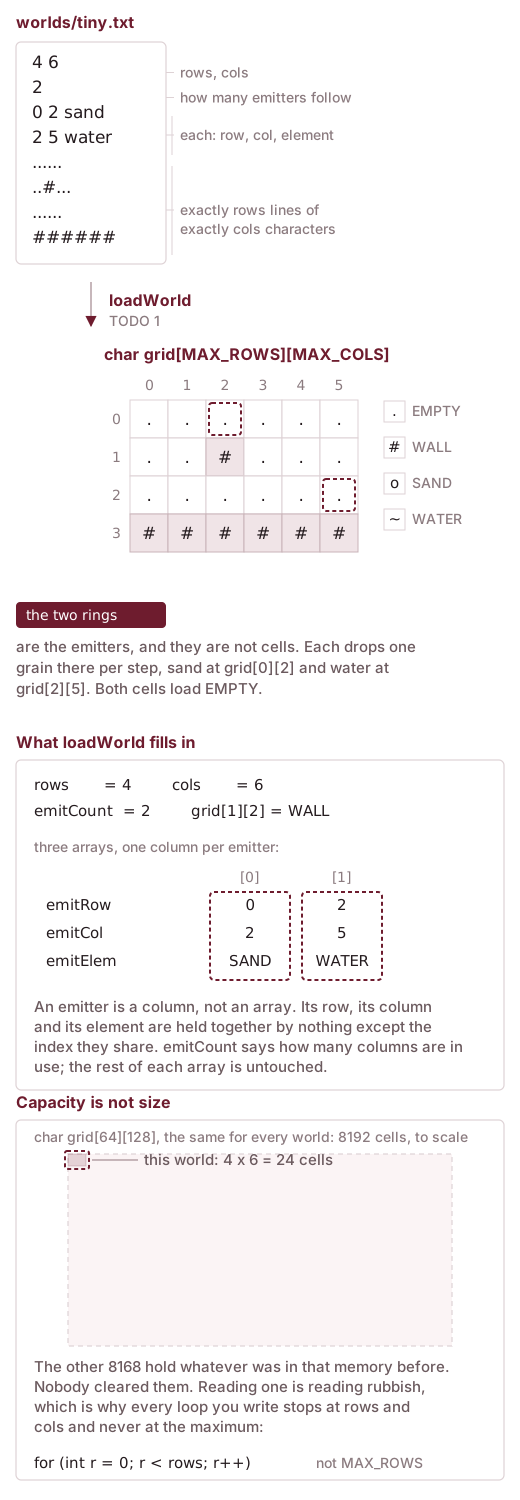
loadWorld turns a file into. The two emitters are the things on the left that do not become characters in the grid. Each is three values spread across three parallel arrays, and the cells they name are still EMPTY when loading finishes.
You will need to use >> for the numbers and the element words, getline for the grid rows (which contain . and # and must be read whole), and an honest end-of-file condition when the grid runs out.
The >> / getline trap. After your last >>, the newline that ends that line is still in the stream. Your very first getline would return an empty string, and every grid row would be off by one. Call getline once before the grid loop and throw the result away.
fin >> emitCount;
string line;
getline(fin, line);      // eat the rest of the line the numbers were on

for (int r = 0; r < rows; r++) {
    getline(fin, line);  // now this is grid row 0
    ...
}
5. TODO 1, loadWorld
Open sandbox.cpp. The first TODO is the largest one in the assignment.
The step-by-step instructions are in sandbox.cpp, not here. The comment block above loadWorld is the most detailed thing you have: it gives the file format again, the shape of the function line by line, the reading trap that catches everybody, and the exact words each error message must contain. Read it first, and keep it open beside you while you write.
This section is the why. It explains what the parameters are doing, what throw is and where it goes, and how to test the result. The two are meant to be read together, and the same is true of TODO 2, 3 and 4.
void loadWorld(const string& filename,
               char grid[][MAX_COLS], int& rows, int& cols,
               int emitRow[], int emitCol[], char emitElem[], int& emitCount);
Everything after filename is an out parameter, loadWorld fills it in for whoever called it. The int& parameters are references, the same out parameters you used in week 1. Arrays are already passed by reference in C++, so grid and the three emitter arrays need no &.
The three emitter arrays are one array of emitters, taken apart. An emitter is three things: a row, a column, and which element it drops. There is no type in this program that holds all three, so they are stored in three separate arrays, and emitter number i is whatever sits at index i in each of them:
int  emitRow[MAX_EMITTERS];    // emitter i is at row emitRow[i] ...
int  emitCol[MAX_EMITTERS];    // ... column emitCol[i] ...
char emitElem[MAX_EMITTERS];   // ... and drops emitElem[i]
int  emitCount;                // how many of the slots are in use
That is a parallel arrays layout. Reading 0 2 sand from the file means writing 0 into emitRow[0], 2 into emitCol[0] and SAND into emitElem[0]: one line of the file, three separate assignments, held together by nothing but the index. Get the indices out of step and emitter 0 drops the wrong element in the wrong place, with no error anywhere.
emitCount is the only thing that says how much of each array is real. The rest of all three is uninitialized, exactly like the part of grid past rows and cols.
Look at Figure 1 again with this in mind. The emitter table in the lower card is three arrays drawn as three rows, and each emitter is one column through all three.
Why does grid have a size in it? Look at the type: char grid[][MAX_COLS]. The row count is missing but the column count is not. A 2D array is one contiguous block of memory, laid out row after row, and to find grid[r][c] the compiler computes r * MAX_COLS + c. Without knowing how wide a row is, it cannot do that arithmetic. This is the same pointer arithmetic you did in week 0, with one more dimension on top.
Eight parameters is a lot to carry around, and you are about to feel it. So is splitting one emitter across three arrays. If both of those feel clumsy, that is the correct reaction, and they are the same complaint. There is no type here that holds several values together as one thing. Next week you will meet classes, which exist in large part to solve exactly that. An emitter becomes one value you can pass, copy and keep in a single array, and the signature above gets shorter.
Throwing when the file is wrong
Look at the signature again. loadWorld returns void. It has no way to tell you it failed. If the file is missing, or the grid runs out halfway, the function reaches its closing brace with rows, cols and grid half filled in, and main() carries on simulating garbage.
You could change it to return a bool and check it at the call site. That works, and it is what C does, and it fails the moment somebody forgets to check. C++ gives you something that cannot be forgotten.
What throw does. It abandons the function on the spot. Nothing after it in loadWorld runs, no half-filled grid gets handed back, and control jumps straight to the catch block in main(), however many function calls deep you were. This is Wednesday’s lecture; what follows is the part you need to write TODO 1.
Where it goes. Inside loadWorld, at the moment you notice the problem. The first check is the file itself:
ifstream fin(filename);
if (!fin) {
    throw runtime_error("cannot open file: " + filename);
}
runtime_error is a type from <stdexcept>, already included at the top of sandbox.cpp, and the string you hand it is carried along with the exception. That is the string main() prints. Everything below that if is now safe to write as though the file opened, because if it did not, execution never gets there.
The second check has the same shape, and so do the other two:
fin >> rows >> cols;
if (rows < 1 || rows > MAX_ROWS || cols < 1 || cols > MAX_COLS) {
    throw runtime_error("bad dimensions: " + to_string(rows)
                        + " by " + to_string(cols));
}
Read a value, test it, throw if it is wrong.
Do not expect exactly four throw lines, though. bad dimensions covers both the grid size and the emitter count. unknown character covers both an emitter’s element name and a character in the grid. And the checks that guard the grid belong inside the loop that reads it, so they run on every row and every character rather than once. Put each check where the value it tests has just been read, and the count takes care of itself.
These are the four things that must be caught, and the words your message must carry when you catch them. The autograder looks for the quoted words somewhere in the message; the rest of it is yours to write. Make it helpful, because it is what a student reads when their own world file is wrong.
| When | Your message must contain |
|---|---|
| The file will not open | cannot open file |
rows or cols is outside 1 … MAX_ROWS / 1 … MAX_COLS |
bad dimensions |
| The file runs out of rows, or a row is too short | grid ended early |
A grid character is not . # o ~, or an emitter’s element is not sand or water |
unknown character |
You do not need to check that emitters sit inside the grid, main() already does that.
main() catches these for you, at the bottom of the file:
catch (const runtime_error& e) {
    cerr << "Error: " << e.what() << endl;
    return 1;
}
Note const runtime_error&, caught by reference. Catching by value would copy the exception object, and with a hierarchy of exception types it would slice off everything the derived type added. Always catch exceptions by reference.
Notice what the try block in main() wraps: the load, the whole simulation, and the saves. A throw anywhere in there unwinds the stack straight down to that one catch. You do not have to check a return value at every level, and there is no way to accidentally continue with a broken world.
Try it against the three broken worlds you were given, plus one that is not there at all, which needs no file. Zero steps and --quiet, because you are testing the load, not the simulation, and neither of those has anything to do with four hundred frames of animation:
./sandbox worlds/badDims.txt 0 --quiet       # bad dimensions
./sandbox worlds/short.txt 0 --quiet         # grid ended early
./sandbox worlds/badChar.txt 0 --quiet       # unknown character
./sandbox worlds/doesNotExist.txt 0 --quiet  # cannot open file
A case you have handled prints one line and stops. This is the reference solution’s wording; yours will differ, and only the quoted words from the table have to match:
Error: grid ended early: expected 8 rows, found 5A case you have not handled yet looks like this instead:
Simulated 0 steps of worlds/short.txt (8x12), 1 frames.
No out.txt was written. saveWorld, TODO 2, is still empty.
No replay.html was written. saveReplay, TODO 4, is still empty.Read that second one carefully, because two thirds of it is noise. The two No ... was written lines are not about this test at all. They are the program reporting on TODO 2 and TODO 4, and they will be there after every run until you write those. Ignore them while you are on TODO 1.
The line that matters is the first one. Simulated 0 steps means the program accepted a file you know is broken and carried on. That case is not handled yet. This line should never appear for any of the four.
Without --quiet it is worse: an unhandled broken file loads as some plausible size and animates, so you get forty lines of blocks scrolling past before those same three lines. That is still the same message, buried.
6. TODO 2, saveWorld
Take a deep breath. You are about to save the world.
Much shorter than the last one. Write the grid out in the same format loadWorld reads:
line 1     rows and cols, separated by a space
line 2     the emitter count, which you always write as 0
then       rows lines of cols characters
Line 2 is the same field loadWorld reads on line 2 of a world file, and you always write 0 there. You are saving the finished grid. The sand has already fallen. An emitter is an instruction to keep producing more of it, and out.txt is a photograph, not a scenario. Reload it and you should get the picture back, not a world that starts filling up again.
That is also what makes out.txt a valid world file in its own right: same header, same shape, so ./sandbox out.txt 10 works. Run ./sandbox worlds/oneGrain.txt 5 --quiet and put the two side by side, the input on the left and what you wrote on the right. One grain, five steps, five rows lower:
worlds/oneGrain.txt           out.txt
16 9                          16 9
0                             0
.........                     .........
....o....                     .........
.........                     .........
.........                     .........
.........                     .........
.........                     .........
.........                     ....o....
An ofstream behaves exactly like cout, same <<, same everything:
#include <fstream>

ofstream fout(filename);
fout << rows << " " << cols << "\n";Check your first two functions against each other. Run zero steps: nothing moves, so what comes out must be exactly what went in.
./sandbox worlds/hourglass.txt 0 --quiet
diff <(tail -n +3 worlds/hourglass.txt) <(tail -n +3 out.txt)
If diff prints nothing, loadWorld and saveWorld are both right. If it prints something, you have found a bug before writing a single rule.
7. The Rules
Once per step, every grain gets at most one move. Walls never move. Empty cells are not grains and do nothing.
Sand, try these in order and stop at the first one that works:
- The cell below is empty → move down.
- The cell below holds water → swap places with it. (Sand is heavier; it sinks through, and the water ends up above it.)
- The cell below-left is empty → move down-left.
- The cell below-right is empty → move down-right.
- Otherwise → stay put.
Water, the same idea, with two more options:
- The cell below is empty → move down.
- The cell below-left is empty → move down-left.
- The cell below-right is empty → move down-right.
- The cell to the left is empty → move left.
- The cell to the right is empty → move right.
- Otherwise → stay put.
Sand gets lower or stays. Water gets lower if it can, and if it cannot, it spreads out.
Left is always tried before right. Every one of these lists is in strict priority order, and ties never go to chance. The version of this project that ran last spring picked left or right at random, which meant no two runs of the same world ever agreed, and nothing about it could be checked automatically. A fixed tie-break costs you a little realism, water leans left rather than leveling perfectly, and buys you a simulation you can test.
Before you look at any neighbor, check that it exists: r + 1 < rows, c - 1 >= 0, c + 1 < cols. The bottom row has nothing below it, and reading grid[rows][c] is exactly the kind of out-of-bounds access C++ will happily let you do and then behave strangely about.
8. TODO 3, step
void step(char grid[][MAX_COLS], int rows, int cols);Visit every cell. Apply the rules.
Write it now, with two nested loops, and pick whichever loop direction seems natural to you. Do not think about it too hard. Then go straight to §9, which is about what happens next.
Meet catch
tests.cpp contains unit tests for each rule, on grids small enough to check by hand. Open it. Each test builds a tiny world, calls step() once, and states what the grid must look like afterwards:
TEST_CASE("sand falls into empty space below", "[sand]") {
    build(grid, {"...",
                 ".o.",
                 "..."}, rows, cols);

    step(grid, rows, cols);

    REQUIRE(picture(grid, rows, cols) == vector<string>{"...",
                                                        "...",
                                                        ".o."});
}
These are written with catch, a testing framework that is nothing but the single header catch.hpp sitting in your repository. REQUIRE is a close relative of the assert() you used in a01, with one useful difference: when a REQUIRE fails, it prints what it got next to what it wanted, and then moves on to the next test instead of killing the program. So a run tells you about all your failures at once.
make tester
./tester                              # all of them
./tester -s                           # all of them, showing every REQUIRE
./tester "sand sinks through water"   # one of them, by name
Read them before you write anything. They are the specification for §7, written in a form the compiler can check, and the ability to state what code must do before writing it is most of what next week’s assignment is about.
9. The Experiment
You have a step(). Before you run a big world, run the smallest one there is.
worlds/oneGrain.txt is a tall empty column with a single grain of sand near the top and a floor at the bottom. Open it and look at it.
Write down your answer to this before you run anything:
After one call to
step(), which row is the grain in?
Now run exactly one step:
./sandbox worlds/oneGrain.txt 1 --quiet
cat out.txtIf the grain is where you predicted, run ./sandbox worlds/oneGrain.txt 1 again without --quiet, and also try ./tester "a grain moves at most one cell per step". If both agree with you, you happened to pick the right loop direction the first time, read the rest of this section anyway, because it explains why you were right, and you will need that in week 5.
For most of you, the grain is sitting on the floor. One step, and it fell the entire height of the column.
Nothing in your rules says that. Rule 1 moves a grain down by one cell. Read your step() again, it is not wrong. Reading it more carefully will not help, so stop reading and start debugging.
Find it with the debugger
So far, when you wanted to know what your program was doing, you added a cout. That works, but it makes you guess in advance what to print. A debugger stops your program mid-run and lets you look at everything.
Take fifteen minutes to learn it here and you will use it for the rest of the course.
Everything below is already set up in your repository. .vscode/launch.json holds three ready-made debug configurations, and the -g flag in the makefile puts the debug information into the executable that makes any of it possible. (Without -g, the debugger cannot tell which machine instruction belongs to which line of your source, and breakpoints do nothing.)
1. Set a breakpoint. Open sandbox.cpp and find the line inside step() where sand moves down. Click in the margin just to the left of its line number. A red dot appears. That is a breakpoint: a line where you want the program to stop.
2. Start debugging. Press F5. At the top of the window a dropdown appears choose Debug one unit test. That builds the project and runs ./tester "a grain moves at most one cell per step" under the debugger: one grain, one step, nothing else happening anywhere.
3. Read the screen. Your program stops on the red dot, and a yellow arrow marks it. Look at three things:
| Where | What it shows |
|---|---|
| Variables, upper left | every variable in scope, right now, including r and c |
| Call Stack, lower left | who called the function you are stopped in |
| The toolbar at the top | Continue (F5), Step Over (F10), Step Into (F11), Stop |
Look at r and c in the Variables panel and write them down.
4. Continue. Press F5 again. The program runs until it hits the same breakpoint the next time. Look at r and c again.
Here is the question the debugger answers, and the cout would not have: within a single call to step(), how many times does that line run for the same grain?
It should be exactly once. Keep pressing F5 and watching r. You will see it run again. And again. And again, once per row, all the way to the floor.
Click the top frame’s caller in the Call Stack panel to jump to the line in tests.cpp that called step(). That is how you answer “how did I get here?”, and it becomes essential in week 9 when you start writing recursive functions and the call stack is twelve frames deep.
What is actually happening
Suppose your outer loop runs top to bottom. You are at row r, you find a grain, and you move it down into row r + 1.
Then your loop moves on to row r + 1, and finds the same grain there, sitting in a cell you have not visited yet this pass. Nothing marks it as having already moved. So it moves again. And again, once per row, all the way down, in a single step. The grain gets carried by your own loop.
The fix is to visit rows in the order that makes a moved grain land somewhere you have already been:
Scan from the bottom row upward. Start at rows - 1 and count down to 0. A grain that moves down lands in a row this pass has already finished with, so it cannot be picked up a second time.
Change the outer loop, rebuild, and run the experiment again. The grain moves one row.
Remember two things from this:
- This bug is invisible in the source. Every individual line was right. Only the order in which the loop visits cells was wrong, and the only way to see it was to watch the program run.
- There is a second way to fix it: keep two grids, read from one and write to the other, and swap them at the end of the step. Then nothing you write during a pass can affect what you read during that pass. You do not need it here, but hold on to the idea, it comes back.
One more of the same, smaller
There is one move that scanning bottom-to-top does not protect you from. Sand only ever moves down into an already-finished row. Water rule 5 moves it sideways into the next column, which your inner loop has not reached yet. A moment later it arrives there, finds the same grain, and gives it a second turn in the same step.
The fix is the same idea, in one line. After moving water right, step the column counter past it.
grid[r][c]     = EMPTY;
grid[r][c + 1] = WATER;
c++;              // this grain already moved; do not visit it again
Now run these and watch:
./sandbox worlds/hourglass.txt 300
./sandbox worlds/cistern.txt 250
./sandbox worlds/quarry.txt 200
10. TODO 4, saveReplay
The last function, and the shortest interesting one. It writes every frame of the run into a single HTML file with a play button and a scrubber.
The page and the JavaScript player are handed to you as two string constants, REPLAY_HEAD and REPLAY_TAIL. You write what goes between them:
fout << REPLAY_HEAD;

// one line:  rows, cols and frameCount, separated by spaces
// then:      for each frame, `rows` lines of `cols` characters

fout << REPLAY_TAIL;
frames is a 3D array, one more dimension than the grid, with the frame number on the front:
void saveReplay(const string& filename,
                char frames[][MAX_ROWS][MAX_COLS],
                int frameCount, int rows, int cols);
frames[f][r][c] is the character at row r, column c of frame f. Notice that the two rightmost sizes are in the parameter type now, for the same reason MAX_COLS was there before: the compiler needs both to do the arithmetic.
So this is the nested loop from saveWorld with one more loop wrapped around it.
Nothing else goes in the file. No separators between frames, no blank lines, no trailing message. The JavaScript counts lines, so one extra line shifts every frame after it.
extern, and why only on those two
sandbox.h declares the two constants like this:
extern const string REPLAY_HEAD;
extern const string REPLAY_TAIL;
but the constants at the top of the same file have no extern:
const char EMPTY = '.';
const int  MAX_ROWS = 64;
Both are const, both are at file scope, and only one pair needs the keyword. The reason is a rule that surprises most people the first time they meet it.
A const at file scope is private to its own .cpp file. Every source file that includes sandbox.h gets its own EMPTY, its own MAX_ROWS, and nobody minds. A one-byte constant the compiler folds into the instruction that uses it costs nothing to duplicate, and four private copies can never disagree. (Anything not const behaves the opposite way and is shared by default, which is the part that makes this feel backwards.)
Now try the same thing with the replay page. REPLAY_HEAD is several kilobytes of HTML and JavaScript, and it is a std::string, so it is not folded into anything. It is a real object that has to be built at run time before main starts. Four private copies means four constructions of the same large string and four times the memory, for one program.
extern opts out of that rule. It turns the line into a declaration: a promise that somewhere in this program there is a const string by that name, with the linker left to find it. The definition, the line that actually makes the object, sits in render.cpp:
const string REPLAY_HEAD = R"HTML(<!DOCTYPE html> ... )HTML";One object, built once, and every .cpp that includes the header refers to that same one.
One detail that bites later, because it fails at link time rather than compile time. The definition in render.cpp does not repeat the word extern, and does not need to, because render.cpp includes sandbox.h on its first line. The extern declaration is already visible, so the definition inherits it. Remove that #include and the definition quietly goes back to being private, render.cpp still compiles perfectly well, and the build dies at the end with an undefined reference coming from a file you did not touch.
If you want the rules rather than this one example, learncpp on internal linkage and on external linkage are the clearest short treatment.
When it works, open replay.html the same way you opened demo.html back in §3.1:
python3 -m http.server 8000 # then http://localhost:8000/replay.htmlPut the two side by side, demo.html is a recording of a correct simulator, so if yours looks different, that difference is a bug you can see.
The file is completely self-contained: no images, no libraries, no network. You can download it and email it to someone and it will just work.
11. Testing Your Work
make testTwenty-nine checks, in eight groups:
| Group | What it looks at |
|---|---|
| Bad world files (4) | your program survives each broken file and says why |
| The rules (6) | the catch tests in tests.cpp, one per rule plus scan order |
| Whole scenarios (4) | a full run compared against the reference |
| The replay (2) | replay.html is shaped the way the player expects |
| Your own world (1) | see §12 |
| More bad world files (4) | the same requirements on files built in a scratch folder |
| More scenarios (6) | six more worlds, each leaning on one rule |
| Round trip (2) | your out.txt reloads as a world file, plus one more replay |
Groups 6 to 8 build their world files on the fly rather than reading worlds/, so they check the same requirements on inputs you have not seen. Nothing in them is new. If your code works, they pass.
The scenario checks compare a fingerprint of your out.txt rather than the file itself, so a failure can tell you that something is wrong without telling you what the right answer looks like. When one fails, that is the moment to run the same world without --quiet and watch where it goes wrong.
Every failure comes with a hint. Work through them one at a time, the four functions are independent enough that you can get partial credit for each as you go.
There are no hidden tests. What you run with make test is exactly what the grader runs, all 29 checks. If it passes here, it passes there.
Grading always runs the official test suite and the official worlds/ files, not the copies in your repository. Editing them will not change your score.
12. Design Your Own World
Make a world of your own and save it as worlds/mine.txt.
An hourglass, a waterfall, a maze that sand has to find its way through, your initials in walls with sand pouring over them. Ten minutes, a text editor, and the format from §4.
It is graded on whether it loads and runs, plus two sanity conditions so an empty grid does not count: at least 8 wall characters (#), and either at least 4 grains of sand or water in the grid or at least one emitter. That is the whole rubric. No points for artistry, points for artistry are awarded verbally, in class, on Friday, when we run the good ones on the projector.
./sandbox worlds/mine.txt 300Two things to know while you build one. rows and cols must be within MAX_ROWS (64) and MAX_COLS (128), and no grid line may be shorter than cols, a short line is the grid ended early error you spent §5 implementing, and it is by far the most common mistake here. And an emitter is much more interesting than a grid full of sand. One emitter running for three hundred steps gives you a stream, not a lump.
13. Submit
Before pushing, open README.md and add your name.
In VS Code, click the Source Control icon in the left sidebar, type a commit message, click the checkmark to commit, then sync. From the terminal:
git add .
git commit -m "Complete a03"
git push
Make sure worlds/mine.txt is included, git status will tell you.
Every push is checked automatically. Within a minute or two the Actions tab of your repository shows a run named Autograde. Open it: the job summary says how many checks passed, and names any that failed. Push as many times as you like; the most recent submission is the one that counts.