Overview
This exercise involves studying the syntax of the construct that provides the subprogram abstraction in each of our four languages. Along the way, we will see how parameter passing is handled in each of the languages.
Many programming languages, especially those from the Algol family, make a distinction between two different kinds of subprograms:
A function accepts a set of arguments and returns a single value to its caller, without modifying any of its arguments.
A procedure accepts a set of arguments and returns nothing to its caller, and may (as a side-effect) modify some of its arguments.
As in past weeks, we will solve the same problem in each of our four languages, to compare their subprogram constructs.
This week’s problem is this: given a string named aString, and an integer named pos, write a function that computes the two substrings formed by splitting aString about pos.
To illustrate, suppose that in our language, the index of the first character is zero, and that aString is “hello”. If pos is 3, then our function should compute “hel” and “lo” as the two substrings. If pos is 0, then our function should compute “” (the empty string) and “hello” as the two substrings. In other words, the character at index pos should always be the first character in the second substring.
Since a subprogram that solves this problem must send two substrings back to its caller, our investigation is to examine what mechanism each language provides such problems.
As before, we will provide program “skeletons” that perform much of the work, leaving you free to concentrate on the subprogram being constructed. Each of these skeletons provides a partial “program” to solve this problem, using an implementation of the following simple algorithm:
1. Get aString and pos.
2. Call split() to partition aString about pos into part1 and part2.
3. Display part1 and part2.
To perform step 2 of this algorithm, our “program” will need to use a subprogram that can compute and return (or pass back) two values. The specification of this subprogram is thus:
1 2 3 4Receive: aString, a string, pos, an integer. Passback: part1, the substring of aString prior to pos, part2, the substring of aString following pos.
Our exercise will be to implement such a subprogram in each of our languages.
As usual, we will lead you through the process using Java, after which you will apply similar techiques to solve the problem in the other three languages. As usual, the order in which you do the three exercises does not matter.
If you find the system to be slow in a particular section, save your work and switch to another section, and the “slow” section again later. Begin by accepting the GitHub Classroom assignment for this lab through this link.
Java
Begin by opening the program skeleton Split.java found in the repository. Take a moment to study it, to see how it implements our basic algorithm.
To write a subprogram that performs step 2 of our algorithm, we need some means for that subprogram to send back two pieces of information: the two parts of the string being split.
In other languages, this might be accomplished by defining the subprogram as a procedure. However, Java has no procedures, supporting only method subprograms. In place of the procedure, Java provides the void method—a method that returns nothing.
<MethodDef>       ::=   <Type> <identifier> '(' <ParameterDefs> ')'
                         <Block> ;
<Type>            ::=   'void' | 'char' | 'int' | ... ;
The most efficient approach for parameter passing in C++ would be to use the reference parameter mechanism, but Java does not have reference parameters—the only parameter mechanism Java has is pass-by-value. However, if we pass-by-value a reference to an object, changes to the object referenced are persistent, because our parameter will be an alias for the object. In the picture below, if x is passed-by-value to a method whose name for the argument (i.e. formal parameter) is y, this results in both x and y referring to the same object in memory:
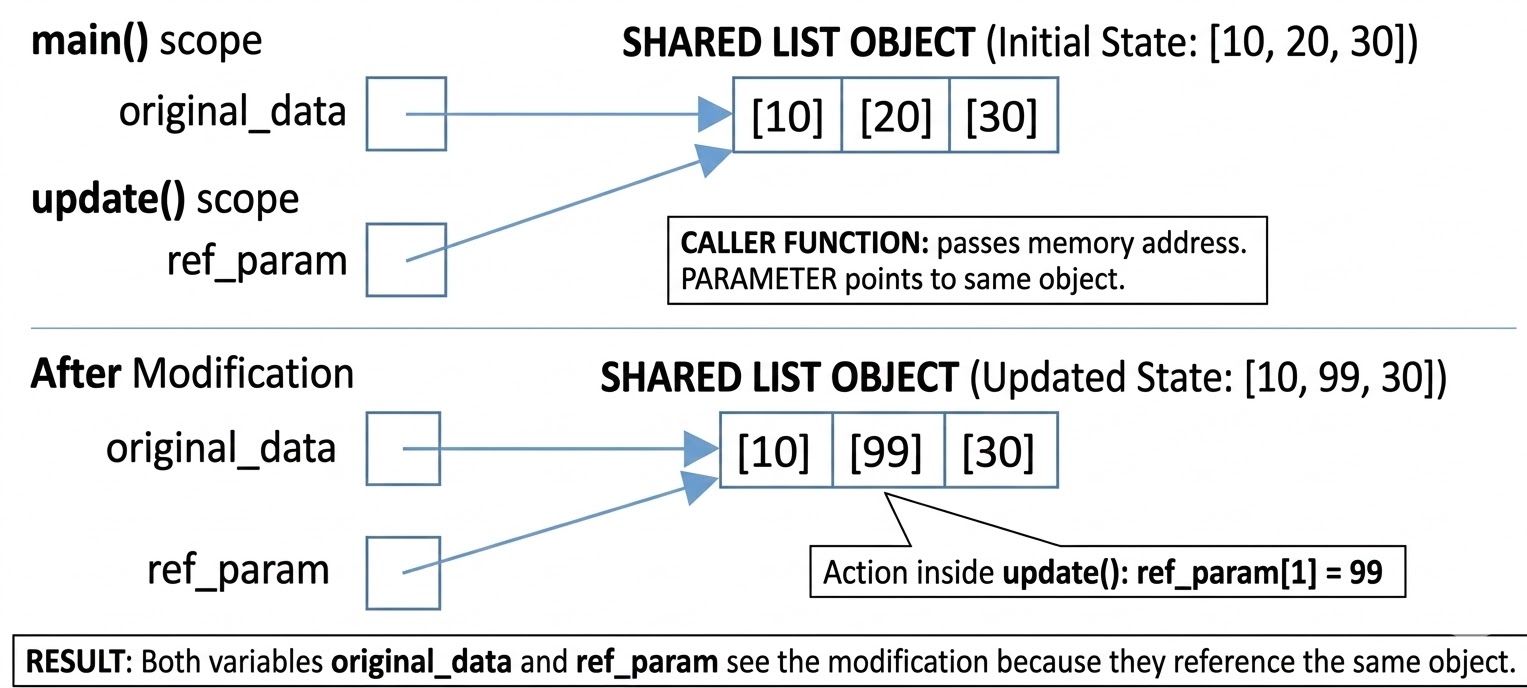
Java’s strings are reference objects, but they are also immutable, which means that their values cannot be changed. Put differently, just passing string references will not be enough to cause the behavior we desire. However, if we put the strings in an array (also a reference object) that we pass-by-value, it will do what we wish (because arrays ARE mutable). As in other C-based languages, Java uses square brackets for array literals, but we must specify both what kind of data the array will hold, and the size of the array when created:
String [] resultList = new String[2];Now we can pass an object of this type to our method splitter() that will do the work to satisfy our problem specification, as follows:
public static void splitter(String theString, int pos, String[] results){
}
To fill in the body of the method, we can use the String method member substring(), whose syntax is:
<StringMsg>        ::=   'substring' '(' <Start>, <Stop> ')'
<Start>            ::=   <IntExpression>
<Stop>             ::=   <IntExpression>
Computing the length of the second substring in order to know where to stop requires that we know the length of our original string. This can be determined using the String method member length():
<StringMsg> ::= 'length' '(' ')'Drawing on these observations, we can write expressions to compute each part:
theString.substring(0, theSplitData.position);
theString.substring(theSplitData.position,
                            theSplitData.theString.length());
Finally, we need to save these results into the array. Updating the array uses the same syntax as C++:
arrayVar[pos] = newValue;Given that we want the first expression above to be saved in the first (i.e. 0th position) of the result array, and the second expression in the second (i.e. 1st position) incorporate each substring expression into an appropriate assignment statement to complete your method.
Compile and test your code for correctness; when it is correct, commit and push your work to GitHub.
That concludes the Java introduction for this lab.
Ada
Begin by opening the program skeleton split.adb from the repository folder. Take a moment to study it, to see how it implements our basic algorithm.
To write a subprogram that performs step 2 of our algorithm, we need some means for that subprogram to send back two pieces of information: the two parts of the string being split.
In Ada, a procedural subprogram is called a procedure:
<Subprogram>      ::=   <Function> | <Procedure>
<Procedure>       ::=   'procedure' <identifier> '(' <ParameterDecs> ')' 'is'
                        <Declarations>
                        'begin'
                        <Statement> ';'
                        <MoreStatements>
                        'end' <identifier> ';' ;
<MoreStatements>  ::=   <Statement> ';' <MoreStatements> | Ø ;
As we have seen before, Ada parameters are defined within the subprogram’s first line, between its parentheses. Ada’s procedure parameters are a bit different than its function parameters:
<ParameterDecs>   ::=   Ø | <ParamDec> <MoreParamDecs> | Ø ;
<ParamDec>        ::=   <idList> ':' <Mode> <Type> ;
<MoreParamDecs>   ::=   ';' <ParamDec> <MoreParamDecs> | Ø ;
<idList>          ::=   <identifier> <MoreIds> ;
<MoreIds>         ::=   ',' <identifier> <MoreIds> | Ø ;
<Mode>            ::=   'in' | 'out' | 'in out' | Ø ;
<Type>            ::=   'integer' | 'natural' | 'positive' | 'float'
                        | 'character' | 'string' | ... ;
Recall that Ada provides the String type for storing sequences of characters (as seen in the main program). Ada actually provides three different kinds of Strings:
Stringdesignates a fixed-length string whose length is determined by its declaration.Bounded_Stringdesignates a string whose length is bounded by a size specified at its declaration.Unbounded_Stringdesignates a string whose length can change during program execution, using dynamic allocation.
For the sake of simplicity, use the type String to declare parameters named The_String, Part1, and Part2.
As indicated in the preceding productions, Ada procedure parameters should be declared with a mode that designates their relationship to their corresponding parameter:
The
inmode is used to designate parameters whose values flow into the procedure, but not out. Put differently, this mode is for parameters whose values will be read, but not written to. Such parameters are the equivalent of value parameters in C++.The
outmode is used to designate parameters whose values flow out of the procedure, but not into it. Put differently, this mode is for parameters whose values will be written to, but not read.The
in outmode is used to designate parameters whose values flow both in and out of the procedure. Put differently, this mode is for parameters whose values will be both read and written to. Such parameters are the equivalent of reference parameters in C++.
If a parameter’s mode is omitted, then the parameter’s mode defaults to in. However, it is considered good style to specify the modes of all parameters in a procedure, for the sake of readability. (All parameters in an Ada function must be mode in, and so the mode is typically omitted for function parameters.)
Using this information, define a subprogram stub named split() that satisfies our problem specification.
To fill in the body of the subprogram, we must be able to select a substring of our parameter the_String. For Ada’s fixed-length strings, this is accomplished using the substring operation:
<SubStringOp>      ::=   <identifier> '(' <Start> '..' <Stop> ')' ;
<Start>            ::=   <PositiveExpression> ;
<Stop>             ::=   <PositiveExpression> ;
This operation returns the substring of the string named identifier, beginning at index Start, and ending at index Stop. (In Ada terminology, this is called the slice operation.)
For fixed-length arrays, the normal Ada assignment operator (:=) can be used to copy values between two arrays provided the arrays are the same length.
Unfortunately, that is not the case here: parameter First_Part is an array whose size generally speaking different than the size of the substring we wish to assign to it. The sizes of Last_Part and the substring we wish to assign to it are similarly mismatched.
The Ada.Strings.Fixed package contains a Move() procedure that can be used to copy between fixed-length strings of different sizes. Its syntax is:
<MoveProcedure> ::= 'Move' '(' <FromStr> ',' <ToStr> ')' ';' ;where FromStr is the string we are copying from, and ToStr is the string we are copying to. This Move() procedure, in combination with the substring operation, can be used to set the values of First_Part and Last_Part.
Ada also provides some special array attributes that are useful for our situation.
By default, the index of the first value in an Ada array is 1, but a programmer is free to use differed index values. An expression like:
arrayName'Firstcan be used to retrieve the index of the first character in an array, regardless of how a programmer has defined that array. Likewise, to find the index of the last value in an Ada array, an expression like:
arrayName'Lastcan be used, regardless of how a programmer has defined that array. To find the length of a fixed-length array in Ada, an expression like:
arrayName'Lengthcan be used.
Drawing on these observations, complete the split() stub. If necessary, use one of the available Ada references to look up the syntax details. Don’t forget to add with Ada.Strings.Fixed; to your program’s with and uses directives!
Compile and test your code for correctness; Since our Ada strings are using default indexes (i.e., indexed relative to 1), test using the position values 1, 4 and 6. When your code is correct, commit and push your work to GitHub.
That concludes the Ada part of this lab.
Clojure
As usual, begin by opening the source program skeleton split.clj in the in your 214/labs/clojure/src folder. Use a text editor to open the file and take a few minutes to study it, to see how it implements our basic algorithm.
Note that the -main() function calls a function named split() to perform step 2 of our algorithm, but the definition of that function is missing.
To write the split() subprogram to perform step 2 of our algorithm, we need some means for that subprogram to send back two pieces of information: the two parts of the string being split.
Recall that LISP-family languages are called functional languages. One reason is that subprograms in LISP-family languages represent pure mathematical functions, meaning
They never modify their arguments, and
They always return a single object (sometimes
nil).
LISP-family functions like Clojure thus have no procedural subprograms, just a function subprogram. As we have seen before, the syntax to define a Clojure function can be described as follows:
<FunctionDef>     ::=   '(' 'defn' <identifier> '[' <Parameters> ']'
                        <Documentation>
                        <ExpressionList> ')'
<Parameters>      ::=    <identifier> <Parameters> | Ø
<Documentation>   ::=    '"' <Characters> '"' | Ø
<ExpressionList>  ::=    <Expression> <ExpressionList> | Ø
Clojure is like Java, in that all arguments are passed by value, but the values passed are references to objects, and Clojure objects are generally immutable (i.e., unchangeable). One way to attack this is to refine our problem specification slightly:
1 2 3 4 5Receive: aString, a string, pos, an integer. Return: A vector whose values are two strings: firstPart, the substring of aString prior to pos, secondPart, the substring of aString following pos.
That is, since a LISP-family function can only return a single object, our function can build a single, 2-element vector object, whose elements are the two strings we wish it to return, and then have our function return this vector. The caller of the function can then extract the parts of the vector using the Clojure get function, as seen in the -main function.
Begin by using the information above to build a function stub named split() in the appropriate place within split.clj. Since the return-value of a LISP-family function is the result of the last expression it computes, we might adjust our algorithm as follows:
1. Compute firstPart , the substring of aString prior to position.
2. Compute secondPart, the substring of aString from     position
    until the end of aString.
3. Build a vector consisting of firstPart and secondPart.
Steps 1 and 2.
To accomplish steps 1 and 2, we can use a let function to define firstPart and secondPart as local variables. The syntax of let can be defined as:
<LetFunction>      ::= '(' 'let' '[' <Bindings> ']' <ExpressionList> ')'
<Bindings>         ::= <Binding> <Bindings> | Ø
<Binding>          ::= <identifier> <Value>
An identifier defined via a Binding in a let function is a local variable whose value is the specified Value. Using this information, add a let function to your split() stub that declares firstPart and secondPart (but don’t worry about their Values just yet). You may want to use the let function in -main() as a model...
To provide variables firstPart and secondPart with Values, we need a function to compute a substring of our aString parameter. This operation is predefined in Clojure via the subs function:
<SubStringOp>      ::=   '(' 'subs' <identifier> <Start> <Stop> ')' ;
<Start>            ::=   <IntExpression> ;
<Stop>             ::=   <IntExpression> | Ø ;
This subs() function returns the substring of the string named identifier, beginning at Start, and ending at (i.e., not including the character at) Stop. The string’s characters are indexed beginning at 0. If Stop is omitted, the last position in the string is the default. Using this information, add calls to your let function so that the initial values of firstPart and secondPart are the appropriate substrings of aString.
Step 3.
To accomplish step 3 of our algorithm in Clojure, we can use the vector function, whose form is:
VectorFunction ::= '(' 'vector' ExpressionList ')'When executed, the vector function builds a vector containing the expressions in ExpressionList, and returns the resulting vector. By placing such a call at the very end of our let function, we can cause it to build and return a vector consisting of the values of firstPart and secondPart. If let is the last function called by split(), and vector is the last function called by let, then the vector built by vector will be the return-value of split().
Drawing on these observations, finish the definition of function split(). You should be able to do this by adding a single function call (with the appropriate arguments).
Save your changes test what you have written for correctness, using the input string hello and the position values. When split.clj is working correctly, commit and push your work to GitHub.
That concludes the Clojure part of this lab.
Ruby
Open split.rb and take a moment to look over its contents, customize its opening documentation, etc.
Like other object-oriented languages, subprograms in Ruby are called methods. Since everything in Ruby is an object, method invocations are messages that are sent to objects. Let’s look at a BNF for a Ruby method:
<MethodDef>      ::= 'def' <identifier> <ParameterDecs> <StatementList> 'end' ;
<ParameterDecs>  ::= '(' <ParameterDec> <MoreParameters> ')' |
                        <ParameterDec> <MoreParameters> | ∅ ;
<ParameterDec>   ::= <identifier> <DefaultArg> ;
<DefaultArg>     ::= = <Expression> | ∅ ;
<MoreParameters> ::= ',' <ParameterDec> <MoreParameters> | ∅ ;
Ruby parameters are not designated to accept a certain type by the syntax; instead, they are assigned a type dynamically according to the arguments passed when the message is sent.
In addition to the standard parameters, Ruby provides two additional parameter types for special situations: the group parameter and the block parameter. Both of these parameters appear at the end of the standard parameter list.
The group parameter is designated by a variable name prefixed by a * symbol. It allows any additional parameters to be collected into an array designated by the variable name. The additional parameters can then be accessed via the array. To illustrate this, here’s an example taken from Programming Ruby:
def varargs(arg1, *rest)
  puts "Got #{arg1} and #{rest.join(', ')}"
end

varargs("one")                  #Produces: Got one and
varargs("one", "two")           #Produces: Got one and two
varargs "one", "two", "three"   #Produces: Got one and two, three
The block parameter is designated by a variable name prefixed by a & symbol. It allows any block that follows the function call to be converted to a Proc object and manipulated within the method. We’ll examine these a bit later in the course.
Ruby has no reference parameters in the sense of C++, so we will have our method return an array containing the two substrings. To return values from a method, recall that Ruby automatically returns the value of the last statement executed, so we just have to end our method with a statement whose value is an array containing the two substrings we want to return. No return statement is needed (but you can use one if you really want to).
Splitting aString
As it happens, Ruby’s String class provides a split() method. However, this method “tokenizes” a string, splitting it into substrings based on a delimiter, so it won’t solve our problem; to do that, we’ll write our own split() function and pass it the String we want to split.
Begin by defining a stub for the split() function, and give it two parameters: aString and position.
In order to retrieve the two substrings, we can use the [] method the String class provides. This method accepts a variety of different arguments that you can read about here. Experiment with those arguments until you find a combination that produces the desired behavior. (Hint: I used two numbers to retrieve the first part and a range to retrieve the second part.) You can use the expression aString.size to find the length of a Ruby string.
In order to pass back the two substrings, we’ll put them into an array. Since Ruby lets us use [] to construct array literals, and since Ruby returns the last statement evaluated, we should be able to write the entire body of split() on one line! See if you can do it.
Be sure to test your program on a variety of input values, as we have done with our other languages.
When you are confident your method is correct, test it using the input string hello and the index values 0, 3, and 5. When your code is correct, commit and push your work to GitHub.
That concludes the Ruby part of this lab.
Rubric
| Task | Points |
|---|---|
Java method splitter() is correctly defined and implemented. | 10 |
Ada procedure split() is correctly defined and implemented. | 10 |
Clojure function split() is correctly defined and implemented. | 10 |
Ruby method split() is correctly defined and implemented. | 10 |
| Total | 40 |
Ways students can lose points:
Failure to define and implement the required subprogram in any of the four languages.
Failure to test the subprogram in any of the four languages.
Failure to commit and push work to GitHub.
Failure to write a clear and informative commit message when committing work to GitHub.
Failure to write a clear and informative commit message when pushing work to GitHub.