Homework 2
Querying the Indie Game Catalog
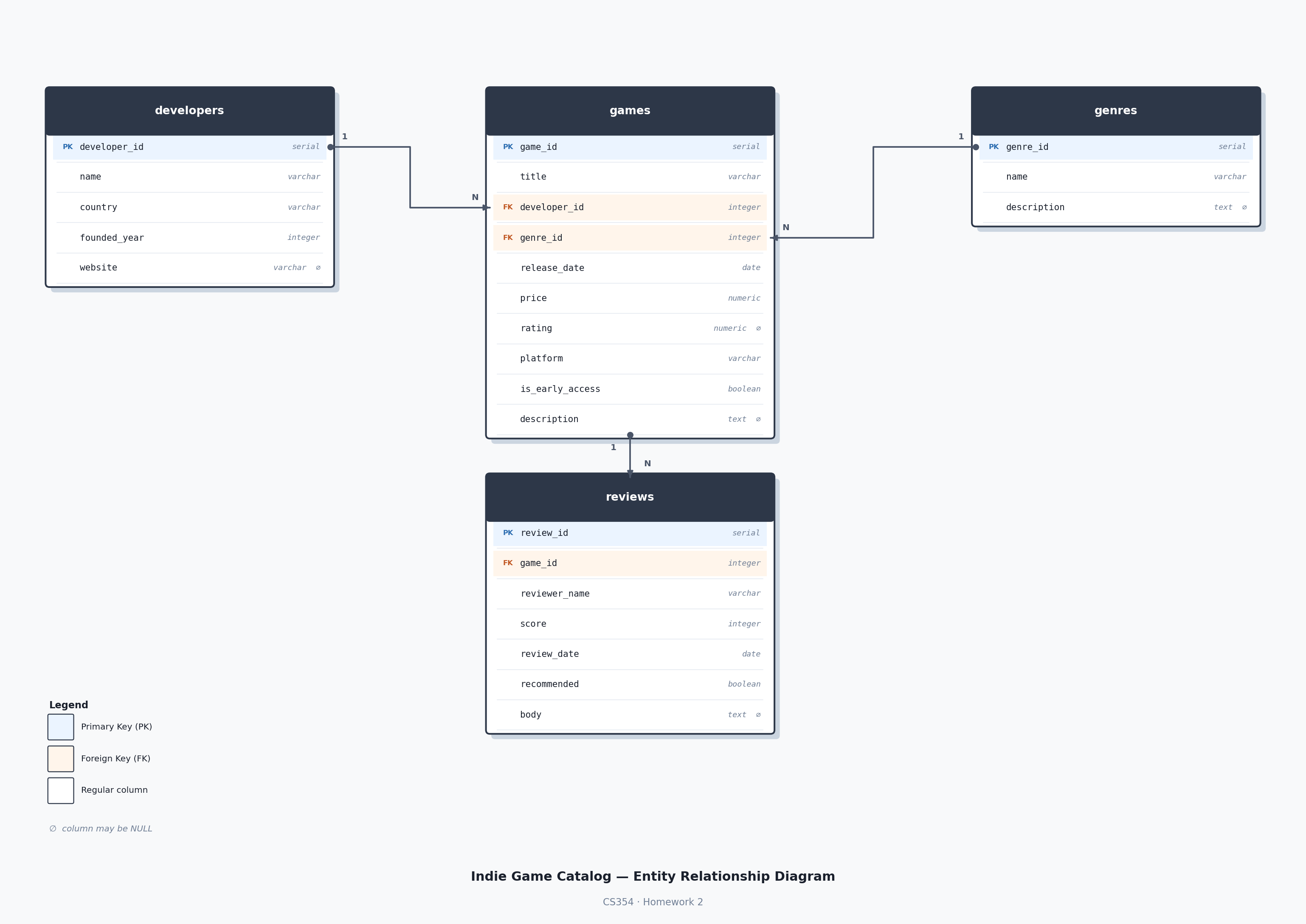
In this assignment you will practice writing SQL queries against a database of indie video games. The database has four related tables — developers, genres, games, and reviews — and covers the real-world catalog of indie titles you may already know.
There are 30 questions worth 150 points total (5 points each). All questions use only the concepts covered in Weeks 0–2: SELECT, WHERE, ORDER BY, DISTINCT, calculated columns, aliases, NULL handling, string and date filtering, logical operators, IN, and LIKE.
The Database
The database is named indiegames and contains four tables.
developers
Studios and individuals who make games.
| Column | Type | Notes |
|---|---|---|
developer_id | integer | Primary key |
name | varchar | Developer or studio name |
country | varchar | Country of origin |
founded_year | integer | Year the developer was founded |
website | varchar | Website URL — may be NULL |
genres
A lookup table for game genres.
| Column | Type | Notes |
|---|---|---|
genre_id | integer | Primary key |
name | varchar | Genre name (e.g. Roguelite, RPG) |
description | text | Description — may be NULL |
games
The main table. Each game belongs to one developer and one genre.
| Column | Type | Notes |
|---|---|---|
game_id | integer | Primary key |
title | varchar | Game title |
developer_id | integer | References developers |
genre_id | integer | References genres |
release_date | date | Release date |
price | numeric | Price in USD (0.00 = free) |
rating | numeric | Rating out of 10 — may be NULL (unrated games) |
platform | varchar | One of: PC, Nintendo Switch, PS5, Xbox |
is_early_access | boolean | TRUE if currently in Early Access |
description | text | Short description — may be NULL |
reviews
Player reviews for individual games.
| Column | Type | Notes |
|---|---|---|
review_id | integer | Primary key |
game_id | integer | References games |
reviewer_name | varchar | Reviewer’s username |
score | integer | Score from 1 to 10 |
review_date | date | Date review was written |
recommended | boolean | Whether the reviewer recommends the game |
body | text | Written review text — may be NULL (score-only reviews) |
Entity-Relationship Diagram
The Questions
There are 30 questions, each in its own .sql file (q01.sql through q30.sql). Open each file and write your query below the comment block.
| # | Table(s) | Question |
|---|---|---|
| 1 | games | List all columns and all rows from the games table. |
| 2 | games | List the title, price, and platform of every game. |
| 3 | games | List each game’s title, original price, and a discounted price that is 90% of the original price (column: discounted_price, rounded to 2 decimal places). Order by title. |
| 4 | games | List the title and price of all games, ordered by price from highest to lowest. Break ties alphabetically by title. |
| 5 | developers | List the name, country, and founding year of every developer, ordered by founding year from oldest to newest. Break ties alphabetically by name. |
| 6 | games | List each unique platform. Each platform should appear only once. Order alphabetically. |
| 7 | developers | List each unique country in the developers table. Each country should appear only once. Order alphabetically. |
| 8 | reviews | List the reviewer name, score, and review date of all reviews where the score is 9 or higher. Order by score descending, then reviewer name. |
| 9 | games | List the title and price of all games that cost less than $15.00, ordered by price ascending. Break ties alphabetically by title. |
| 10 | games | List the title, platform, and rating of all games available on PC. Order by title alphabetically. |
| 11 | games | List the title and price of all games priced between 25.00 (inclusive). Order by price, then title. |
| 12 | games | List the title and platform of all games that do not yet have a rating (rating IS NULL). Order by title. |
| 13 | games | List the title and rating of all games that have a rating, ordered from highest to lowest. Break ties alphabetically. |
| 14 | developers | List the name and country of all developers that have no website listed. Order by name. |
| 15 | games | List the title and release date of all games released on or after January 1, 2020. Order by date, then title. |
| 16 | games | List the title and release date of all games released between January 1, 2015 and December 31, 2019 (inclusive). Order by date, then title. |
| 17 | games | List the title, platform, and early access status of all PC games that are currently in early access. Order by title. |
| 18 | games | List the title and platform of all games available on PS5 or Xbox. Order by platform, then title. |
| 19 | games | List the title and price of all games that are NOT free. Order by price ascending, then title. |
| 20 | games | List the title and platform of all games on Nintendo Switch, PS5, or Xbox. Order by platform, then title. |
| 21 | developers | List the name, country, and founding year of all developers based in the USA, Canada, or Australia. Order by country, then name. |
| 22 | games | List the titles of all games whose title starts with the letter H. Order alphabetically. |
| 23 | games | List the titles of all games whose title contains the word “of”. Order alphabetically. |
| 24 | developers | List the name and website of all developers with a website ending in .com. Order by name. |
| 25 | reviews | List the reviewer name and score of all reviewers whose name starts with C (case-insensitive). Order case-insensitively by name. |
| 26 | games | List the title and platform of all Nintendo Switch games that are NOT in early access. Order by title. |
| 27 | games | List the title, genre_id, and rating of all Roguelite (genre 1) or Action (genre 7) games with a rating above 9.0. Order by rating descending, then title. |
| 28 | reviews | List the reviewer name, score, and recommended status of all reviews marked recommended but with no written body (body IS NULL). Order by score descending, then reviewer name. |
| 29 | games | List the title, original price, and a sale price at 80% of the original (column: sale_price, rounded to 2 decimal places) for all games rated above 9.0. Order by sale price, then title. |
| 30 | games | List the title, platform, price, and rating of all PC games that have a rating, are NOT in early access, and cost $20.00 or less. Order by rating descending, then title. |
Step 1 — Accept the Assignment
Click the GitHub Classroom invitation link posted on Moodle
Click Accept this assignment
Wait a few seconds, then refresh the page
Click the link to your personal repository
Step 2 — Clone and Open
Open a terminal in your Coder workspace (or locally) and run:
git clone https://github.com/[YOUR-REPO-URL-HERE]
cd hw02-steam-sale-[YOUR-USERNAME]
code .
Step 3 — Set Up Python
python3 -m venv venv
source venv/bin/activate
pip install -r requirements.txt
Remember: activate the virtual environment (
source venv/bin/activate) every time you open a new terminal before runninggrade.py.
Step 4 — Connect to the Database
Follow the same steps as hw01 to connect VSCode SQLTools to the database. Use these settings:
Connection name:  CS354
Server:           localhost
Port:             5432
Database:         indiegames
Username:         admin
Password:         admin
The database is pre-loaded with 50 games, 15 developers, 8 genres, and 77 reviews. No setup needed — start writing queries right away.
To explore the tables, run:
-- Preview a table
SELECT * FROM games LIMIT 5;
SELECT * FROM developers LIMIT 5;
SELECT * FROM reviews LIMIT 5;
Step 5 — Write Your Queries
Each question has its own .sql file. Open the file and write your query below the comment block. Example:
-- ============================================================
-- Question 1 (5 points)
-- List all columns and all rows from the games table.
-- There is no required ordering for this question.
--
-- Expected columns: all columns
-- ============================================================

-- Write your query below:
SELECT * FROM games;Step 6 — Check Your Score Locally
Run the grader before submitting:
python3 grade.pyThe first time you run it, the grader creates and loads the database automatically. Output looks like this:
✅ q01: correct    (5 pts)
✅ q02: correct    (5 pts)
❌ q03: incorrect  (0 pts)
💥 q04: error — syntax error at or near "FORM"  (0 pts)
⬜ q05: empty file  (0 pts)

Score: 10/150
Fix any issues and run grade.py again until you’re happy with your score.
Step 7 — Submit Your Work
When you’re ready to submit:
git add .
git commit -m "completed hw02"
git push
GitHub Actions will automatically run the grader on your submission. To see your results:
Go to your repo on GitHub
→ Click the Actions tab
→ Click the most recent workflow run
→ See ✅ or ❌ per question and your total score
You can push as many times as you want before the deadline — each push triggers a new grading run.
Grading
Each of the 30 questions is worth 5 points. Partial credit is not awarded — a question is either correct or not.
| Component | Questions | Points |
|---|---|---|
| Basic SELECT, ORDER BY, DISTINCT | Q01–Q07 | 35 pts |
| WHERE — numbers, strings, booleans | Q08–Q11 | 20 pts |
| NULL handling and date filtering | Q12–Q16 | 25 pts |
| AND, OR, NOT, IN, LIKE | Q17–Q24 | 40 pts |
| Combined filters and functions | Q25–Q30 | 30 pts |
| Total | 150 pts |