Homework 3
NASA Astronauts Database
Overview
In this assignment, you will complete a small Flask web application by writing SQL queries in queries.py.
The application connects to a read-only PostgreSQL database hosted on Supabase. Your job is to write the queries that power the results shown on the webpage.
This homework covers SQL topics from the first part of the course, including:
SELECTfiltering with
WHEREORDER BYLIMITstring, numeric, and date functions
CASE,COALESCE,NULLIF, andCASTsubqueries with
INand scalar subqueries
This homework does not require JOINs or aggregate functions such as COUNT, SUM, or AVG.
What You Will Do
You will work with a NASA Mission Archive database and a pre-built Flask dashboard.
Your workflow is:
Accept the assignment on GitHub Classroom.
Clone your personal assignment repository.
Configure the Python environment.
Add your Supabase credentials to a
.envfile.Run the Flask app locally.
Open the dashboard in your browser.
Edit
queries.pyand write the SQL for each question.Refresh the webpage to see whether your query is correct.
Commit and push your work when finished.
Files You Should Care About
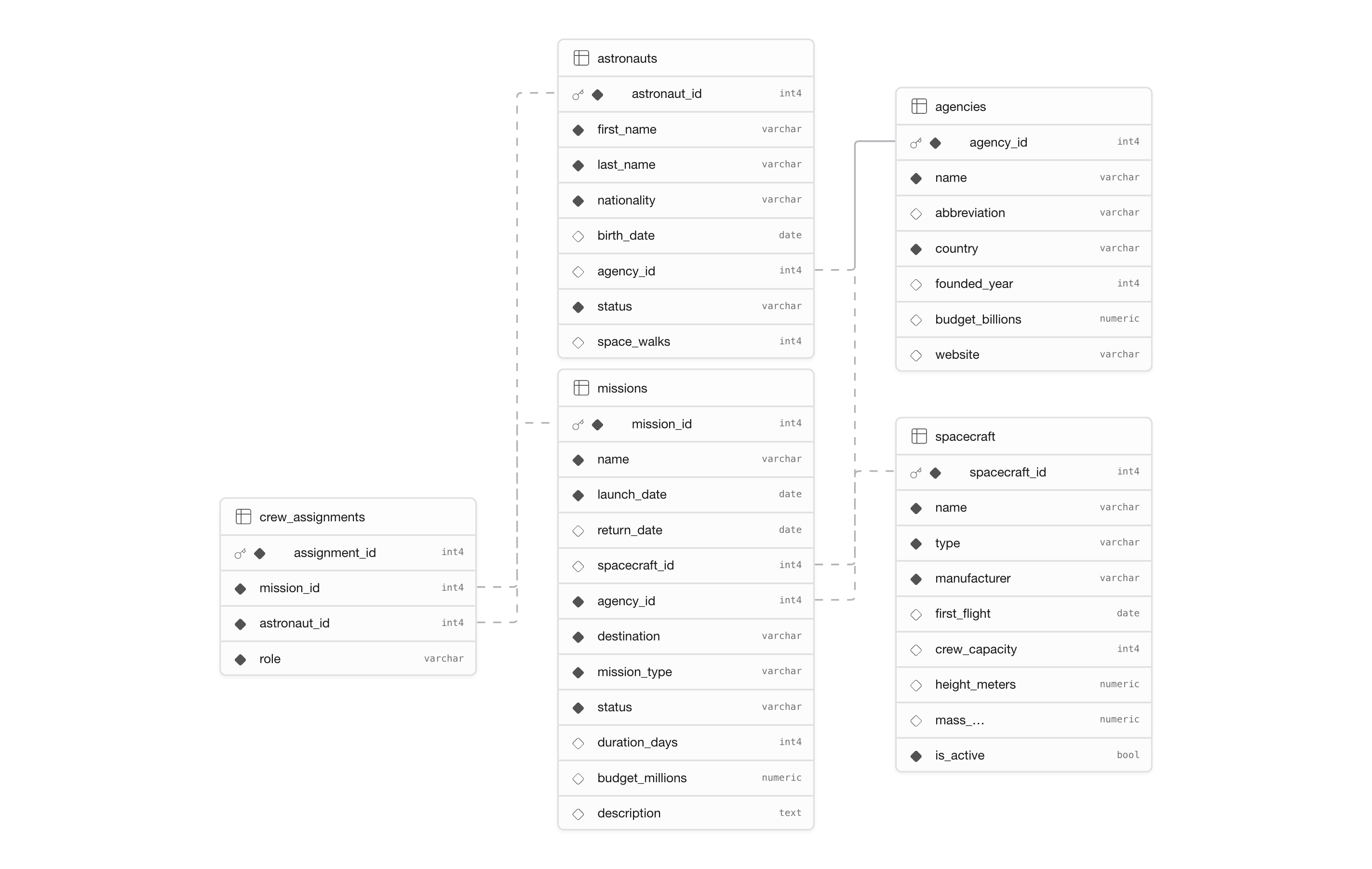
queries.py: this is the main file you will edit.app.py: runs the Flask application.README.md: quick-start instructions.schema.png: visual diagram of the database.templates/andstatic/: webpage layout and styling. You do not need to edit these.
Do not modify app.py, the templates, or the CSS unless your instructor explicitly tells you to do so.
Database Schema
The database contains five tables:
agenciesastronautsspacecraftmissionscrew_assignments
Use this schema diagram as your main reference while writing queries:
Setup
1. Accept the GitHub Classroom assignment
Open the GitHub Classroom invitation link provided by your instructor.
Then:
Click Accept assignment.
Wait for GitHub Classroom to create your personal repository.
Open that repository page on GitHub.
Copy the repository URL.
2. Clone your repository
Clone your personal assignment repository and open it in VS Code.
git clone <your-github-classroom-repo-url>
cd <your-repo-name>
code .
3. Create a virtual environment
From the root of the repository, run:
python3 -m venv venv
source venv/bin/activate
If you are on Windows, use:
python3 -m venv venv
venv\Scripts\activate
After activation, your terminal prompt should show something like (venv).
4. Install dependencies
Install the required Python packages:
pip install -r requirements.txt5. Create the .env file
Copy the example file:
cp .env.example .envThen edit .env and fill in the Supabase credentials provided by your instructor.
It should look like this:
SUPABASE_HOST=...
SUPABASE_PORT=...
SUPABASE_DB=...
SUPABASE_USER=...
SUPABASE_PASSWORD=...
Do not commit .env to git.
Running the App
Start the Flask app from the repository root:
python3 app.pyThen open this URL in your browser:
If port 5000 is already in use on your computer, run:
PORT=5001 python3 app.pyThen open:
How the Webpage Works
Each question appears as a card on the webpage.
For each card, the webpage can show one of several states:
⬜ No query yet: you have not written a query for that question.⚠️ Query Error: your SQL has a syntax error or another runtime problem.❌ Wrong result: your query ran, but the returned rows did not match the expected result.✅ Correct result: your query output matches the expected answer.
The dashboard also shows a running total of how many questions are currently correct.
How to Write Queries
Open queries.py. Each question is represented by a Python function such as q1(), q2(), and so on.
Each function contains a docstring that tells you:
the question prompt
the point value
the expected output columns
ordering requirements
Your job is to replace the empty string with a SQL query.
Important: multiline SQL
If your SQL spans multiple lines, return it as a triple-quoted string:
def q1():
    return """
    SELECT name, launch_date, status, budget_millions
    FROM missions
    WHERE status IN ('Completed', 'Failed')
    ORDER BY launch_date DESC;
    """
This is the safest and most readable way to write longer queries in this assignment.
General workflow for each question
Read the docstring carefully.
Identify the table or tables involved.
Decide which columns need to be selected.
Apply the required filters.
Add aliases exactly as requested.
Add
ORDER BYexactly as requested.Save the file.
Refresh the webpage.
Check whether the result is correct.
Exploring the Data
Before solving a question, it is often useful to inspect the data.
For example, you might temporarily test simple queries such as:
def q1():
    return """
    SELECT *
    FROM missions
    LIMIT 5;
    """
This can help you understand column names and data values. Once you understand the structure, replace the exploration query with your final answer.
Rules and Constraints
You must follow these rules:
Do not use
JOINs.Do not use aggregate functions such as
COUNT,SUM,AVG,MIN, orMAX.Use subqueries when you need information from multiple tables.
Use only standard PostgreSQL syntax.
Do not try to modify the database.
The database credentials you were given are read-only, so statements like these will fail:
INSERTUPDATEDELETEDROPALTERCREATE TABLE
You do not need any of these commands for this assignment.
Submission
When you are finished, submit your work with git:
git add .
git commit -m "Complete hw3"
git push
Only your changes to queries.py should matter for grading.
Troubleshooting
The webpage does not load
Make sure the Flask app is running in the terminal.
You should see output like:
* Running on http://127.0.0.1:5000If port 5000 is busy, run on port 5001 instead:
PORT=5001 python3 app.pyI get “Access to 127.0.0.1 was denied”
Use localhost instead of 127.0.0.1 in the browser address bar.
For example:
The app starts, but every question shows an error
Check your .env file. A wrong host, username, or password can prevent successful database access.
Verify that:
SUPABASE_HOSTis correctSUPABASE_PORTis correctSUPABASE_DBis correctSUPABASE_USERis correctSUPABASE_PASSWORDis correct
My query says “wrong result”
This means your SQL ran successfully, but the returned rows did not match the expected answer.
Common causes:
missing rows because of an incorrect filter
extra rows because the filter is too broad
wrong output columns
wrong aliases
missing or incorrect ordering
forgetting
NULLhandlingreturning duplicate rows when duplicates should be removed
Go back to the docstring and check each requirement one by one.
My query has a syntax error
Read the exact error message shown on the webpage.
Common causes:
missing comma
misspelled column or table name
missing closing parenthesis
forgetting to close a string literal
malformed
CASEexpression
My multiline query breaks Python
Make sure you are using triple quotes correctly:
return """
SELECT ...
FROM ...
WHERE ...;
"""
Do not forget the closing """.
My database command fails with a permissions error
Your account is read-only. Remove any SQL that changes schema or data and rewrite the query as a SELECT.
Rubric
Your assignment will be graded question by question.
Point structure
Q1–Q10: 10 points each
Q11–Q20: 15 points each
Total: 250 points
What earns full credit on a question
To receive full credit for a question, your query must:
run successfully
return the correct rows
return the correct columns
use the correct column names and aliases
follow the required ordering exactly
What may lose credit
You may lose credit for any of the following:
syntax errors
wrong columns or aliases
incorrect filtering conditions
incorrect ordering
missing required transformations
using forbidden features such as
JOINs or aggregate functionsreturning a partially correct but incomplete result
Rubric summary
| Criterion | Full Credit Requirement |
|---|---|
| Correct execution | Query runs with no SQL errors |
| Correct result set | Returned rows exactly match expected output |
| Correct columns | Output columns and aliases are exactly correct |
| Correct ordering | Rows are ordered exactly as requested |
| Constraint compliance | No forbidden features used |
Final Advice
Work one question at a time.
Refresh the webpage often.
Use temporary exploration queries to understand the data.
Read the docstring requirements carefully before assuming your query is done.
When a result is close but not correct, compare your query line by line with the prompt.
Good luck.